
Feed Builder & feed_id 101
A quick introduction to our no-code feed builder and feed objects.
The Feed Builder is a powerful no-code tool that simplifies the process of creating personalized content feeds. With an intuitive visual interface, you can configure filters, scoring algorithms, and feed behavior without writing a single line of code. The output of Feed Builder is a feed_id—a unique identifier that unlocks the Get Recommendations API and allows you to integrate feeds seamlessly anywhere in your application.
For detailed feature information and advanced usage, see the Feed Builder Complete Guide.
What is the Feed Builder?
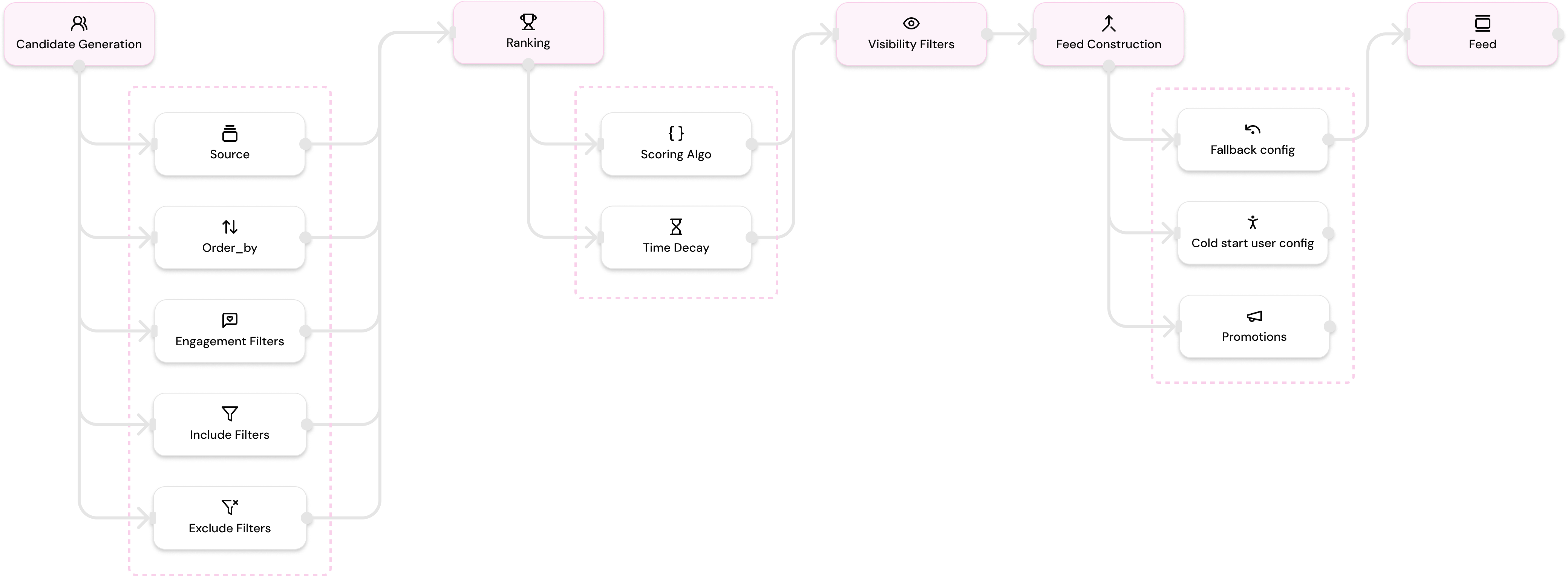
Feed Builder is Embed's visual, no-code interface for creating and managing feed configurations. Instead of manually crafting complex API requests with dozens of parameters, Feed Builder provides a simplified, step-by-step process to:
- Define content sources - Choose what content to include (Farcaster posts, Zora coins, Polymarket markets SOON)
- Apply filters - Narrow down content by topics, authors, channels, engagement, and more
- Configure ranking - Select scoring algorithms to personalize content for each user
- Set visibility rules - Control what users see based on interactions and social proof
- Add feed construction logic - Configure fallbacks, cold starts, and promotions
Once you save your configuration, Feed Builder generates a unique feed_id that represents all your settings. This feed_id becomes the key to accessing your feed through the API.
Why Use the Feed Builder?
No-Code Simplicity
Feed Builder eliminates the need for complex API configurations. You don't need to understand JSON structures, parameter names, or API syntax—just use the visual interface to configure your feed.
Rapid Iteration
Quickly experiment with different feed configurations, test what works best for your users, and iterate without engineering overhead. Change filters, scoring algorithms, or visibility rules and see results immediately.
Non-Technical Team Empowerment
Once your engineering team integrates a feed_id into your application, non-technical team members (PMs, Marketing, Sales, or even your CEO) can modify feed behavior directly from the console—no coding knowledge required.
A/B Testing Made Easy
Easily run controlled experiments by creating multiple feed_ids with different configurations. Assign different feed_ids to different user groups and measure performance to find what works best.
Instant Updates
Update feed behavior for millions of users instantly. When you modify a feed_id configuration in Feed Builder, all API calls using that feed_id immediately reflect the new settings—no code deployments needed.
Getting Started
Step 1: Access Feed Builder
- Log in to your Embed account from the console
- Navigate to Feed Builder from the sidebar
- Click on a template to get started, or create a new feed from scratch
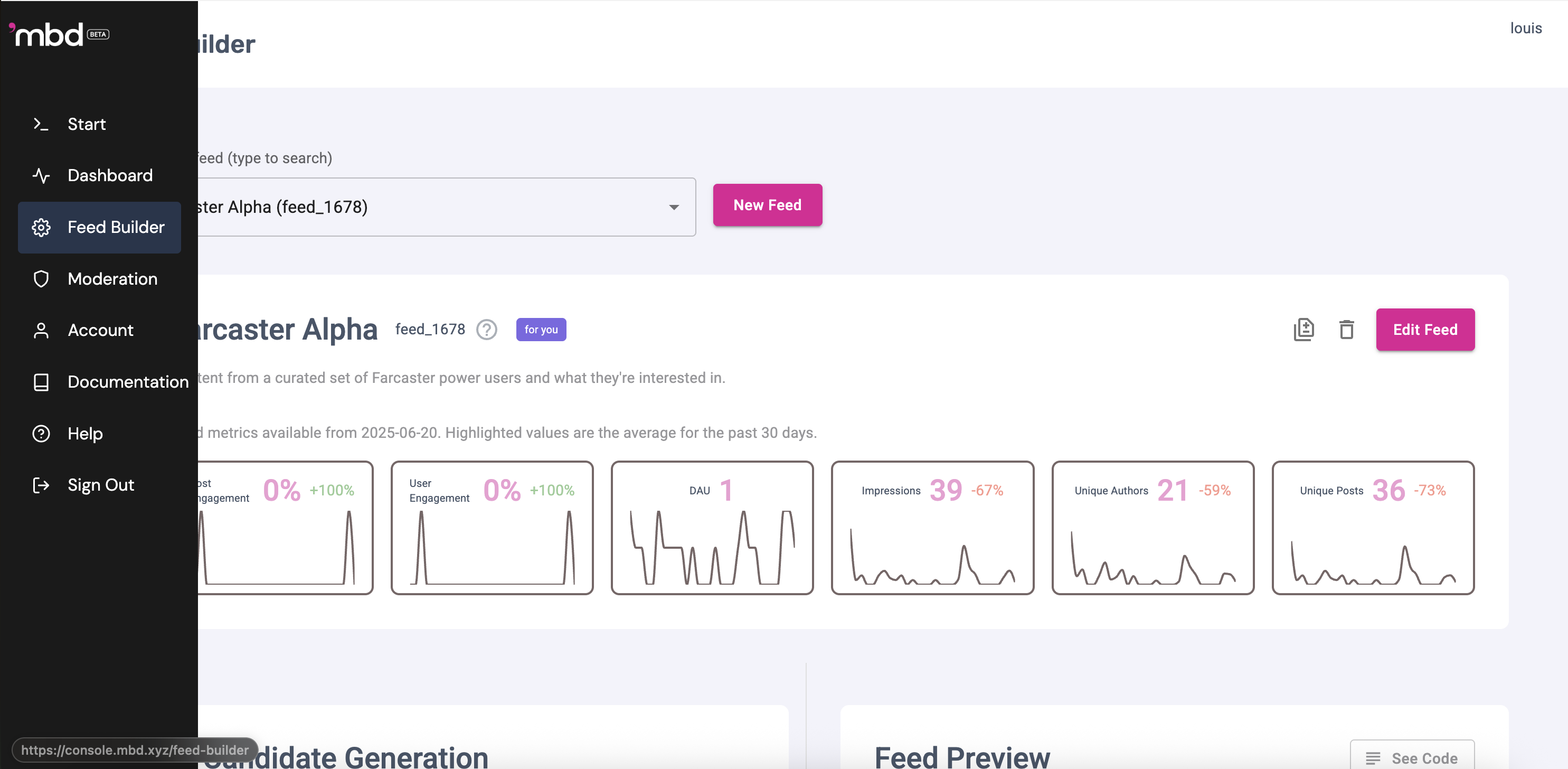
Step 2: Configure Your Feed
Use the Feed Builder interface to configure your feed:
- Candidate Generation: Set filters to define what content to consider
- Ranking: Choose scoring algorithms to personalize content
- Visibility Filters: Control what users actually see
- Feed Construction: Add fallbacks, cold starts, and promotions
Step 3: Save and Get Your feed_id
feed_id- Give your feed a descriptive name
- Click Save Feed
- Your
feed_idis generated automatically (e.g.,feed_390)
Step 4: Use feed_id in API Calls
feed_id in API CallsInclude your feed_id in the body of your Get Recommendations API request:
curl -X POST https://api.mbd.xyz/v3/for-you \
  -H "Authorization: Bearer mbd-YOUR_API_KEY" \
  -H "Content-Type: application/json" \
  -d '{
    "feed_id": "feed_390",
    "user_id": "16085",
    "top_k": 25
  }'
That's it! Your feed is now live and serving personalized recommendations.
What You Get: The feed_id
feed_idThe feed_id is a unique identifier (e.g., feed_390, feed_624) that represents your complete feed configuration. Think of it as a shortcut that encapsulates all your settings:
- All filter configurations
- Scoring algorithm selection
- Visibility filter settings
- Feed construction logic (fallbacks, cold starts, promotions)
When you include a feed_id in an API call, it behaves exactly as if you passed all those parameters directly to the API.
Basic Integration
Here's a simple example of how to use your feed_id in your application:
const response = await fetch("https://api.mbd.xyz/v3/for-you", {
  method: "POST",
  headers: {
    Authorization: "Bearer mbd-YOUR_API_KEY",
    "Content-Type": "application/json",
  },
  body: JSON.stringify({
    feed_id: "feed_390",
    user_id: "16085",
    top_k: 25,
  }),
});

const feed = await response.json();
For more advanced integration examples, SDK usage, and troubleshooting, see the Feed Builder Complete Guide.
Summary
Feed Builder is your no-code solution for creating powerful, personalized content feeds. With a simple visual interface, you can configure complex feed logic and get a feed_id that unlocks seamless integration with the Get Recommendations API.
Key Takeaways:
- ✅ No-code visual interface for feed configuration
- ✅
feed_idis the key to using the Get Recommendations API - ✅ Instant updates without code deployments
- ✅ Easy A/B testing and experimentation
- ✅ Non-technical team members can manage feeds
Start building your first feed in Feed Builder today!
For detailed information about all available features, advanced workflows, and troubleshooting, check out the Feed Builder Complete Guide.
Updated 16 days ago