
The Embed AI pipeline
Embed's AI pipeline is the foundation that powers personalized content recommendations, user discovery, and content moderation across social media platforms. This document explains how we process social media data, extract insights, and generate predictions that enable powerful feed customization through the Feed Builder.
Related: This document explains the technical implementation. For a conceptual overview of data sources, see the Data Sources guide.
The Challenge: Making Sense of Social Media Data
Social media platforms generate massive amounts of data: posts, likes, follows, comments, shares, and more. But raw data alone doesn't create great user experiences. To build personalized feeds, you need to:
- Understand what content is about - Is this post about crypto or gaming? Is the sentiment positive or negative?
- Know who users are - What are their interests? Who do they follow? What content do they engage with?
- Predict what users want - What will they like, comment on, or share next?
- Maintain quality - Filter out spam, detect harmful content, ensure freshness
The Embed AI pipeline solves this by transforming raw social media data into actionable insights through four sequential stages that build upon each other.
The Four-Stage Pipeline
The AI pipeline processes data from both onchain (blockchain-recorded) and offchain (platform-specific) sources through four key stages:
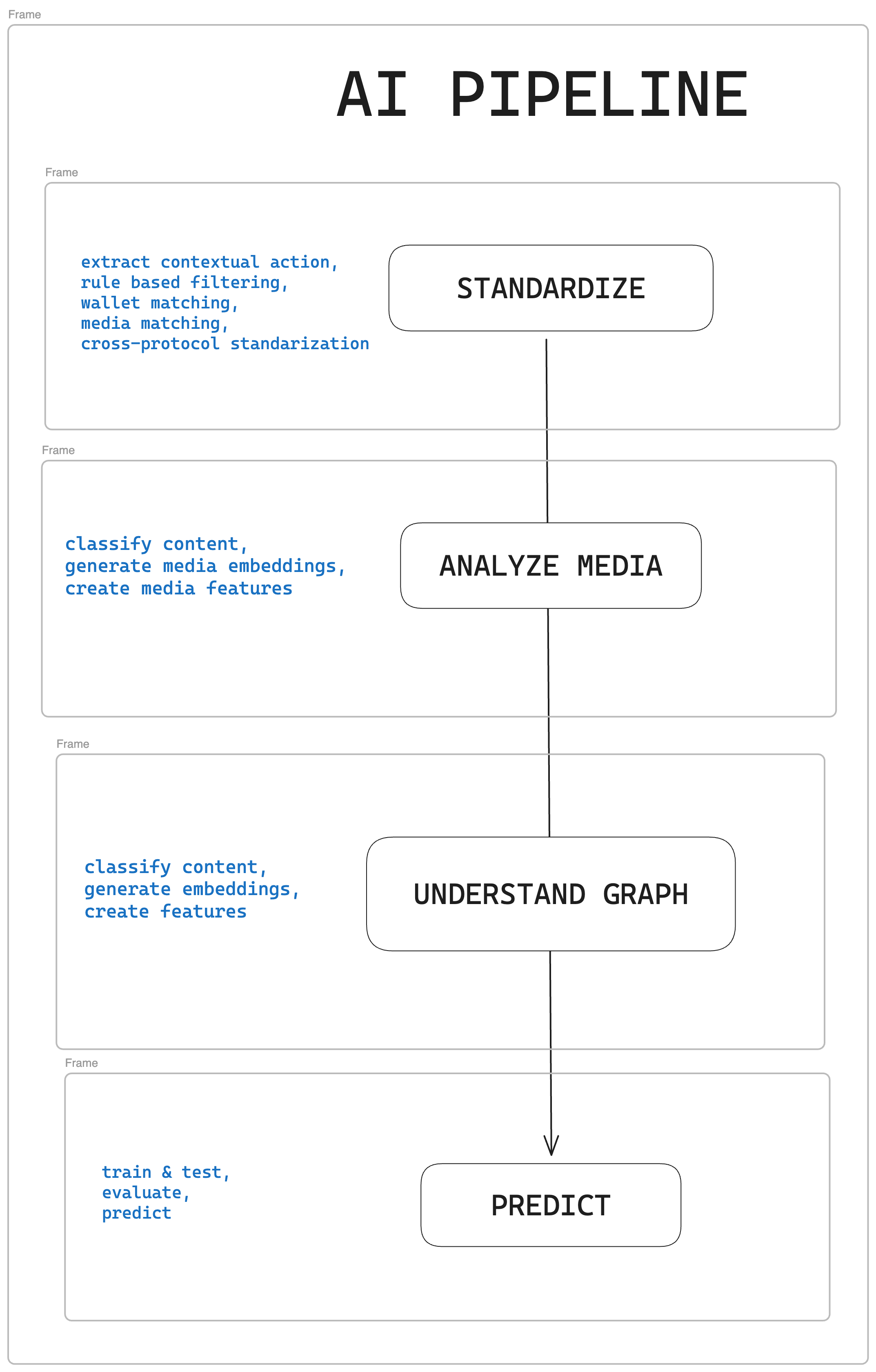
Stage 1: Standardize - Making Data Consistent
The Problem: Different platforms store data differently. A "like" on Farcaster, a "mint" on Zora, and a "bet" on Polymarket are all forms of engagement, but they're structured differently.
The Solution: The Standardize stage cleans and normalizes data from multiple sources into a unified format. This means:
- Converting platform-specific interactions (likes, mints, trades) into standardized formats
- Linking user profiles across platforms (e.g., connecting a Farcaster ID to a wallet address)
- Normalizing timestamps, IDs, and content formats
- Filtering out low-quality content and duplicates
Why It Matters: Without standardization, you can't build AI models that work across platforms. This stage creates the foundation that makes everything else possible.
Example: A user follows someone on Farcaster and mints a Zora coin. Both actions are normalized into the same "user-to-user" and "user-to-item" interaction format, allowing the system to understand the user's behavior patterns across platforms.
Stage 2: Enrich Media - Understanding Content
The Problem: Raw content (text, images, videos) doesn't tell you what it's about or how users might react to it.
The Solution: The Enrich Media stage analyzes content to extract meaningful insights. This includes:
- AI Labels - Automatically categorizing content by topic (crypto, gaming, tech), sentiment (positive, negative), emotions (joy, anger), and moderation needs (spam, hate speech)
- Media Embeddings - Creating vector representations that capture the semantic meaning of content, enabling similarity comparisons
- Content Classification - Identifying media types (image, video, audio) and content structure
Why It Matters: These labels and embeddings become the building blocks for filtering, discovery, and personalization. When you filter a feed by "crypto" topics or find "similar content," you're using outputs from this stage.
Example: A cast about "the latest DeFi protocol" gets labeled with topics like web3_defi and business_entrepreneurs, sentiment positive, and emotion optimism. These labels can then be used to filter feeds or find similar content.
Stage 3: Understand Graph - Mapping Relationships
The Problem: Individual pieces of content and user actions don't reveal the bigger picture—trending topics, communities, influence patterns, or suspicious behavior.
The Solution: The Understand Graph stage analyzes relationships between users and content to discover patterns. This includes:
- Relationship Mapping - Understanding who follows whom, what content users engage with, and how information flows through the network
- Trend Detection - Identifying emerging topics and viral content before they become mainstream
- Community Discovery - Finding clusters of users with similar interests or behaviors
- Anomaly Detection - Spotting bot networks, coordinated behavior, or spam patterns
Why It Matters: Graph analysis enables social-aware recommendations. Instead of just showing content similar to what a user liked, you can show content that's trending in their community or from users with similar interests.
Example: The system notices that users interested in DeFi are also engaging with content about NFTs. This relationship enables recommending NFT content to DeFi enthusiasts, even if they haven't explicitly shown interest in NFTs yet.
Stage 4: Predict - Forecasting Engagement
The Problem: You have clean data, enriched content, and relationship insights—but you still need to predict what each user will actually engage with.
The Solution: The Predict stage uses machine learning models trained on historical data to forecast future interactions. These models:
- Predict User Engagement - Estimate the likelihood a user will like, comment, share, or interact with specific content
- Incorporate Multiple Signals - Combine onchain interaction patterns, content similarity, trending signals, and user preferences
- Continuously Improve - Refine predictions based on new data and user feedback
Why It Matters: Predictions power personalization. When Feed Builder shows you a "For You" feed, it's using these predictions to rank content by how likely you are to engage with it.
Example: Based on a user's past interactions (they like crypto content, follow DeFi creators, engage with educational posts), the model predicts they'll be highly interested in a new DeFi tutorial cast, so it ranks it higher in their feed.
How This Powers Feed Recommendations
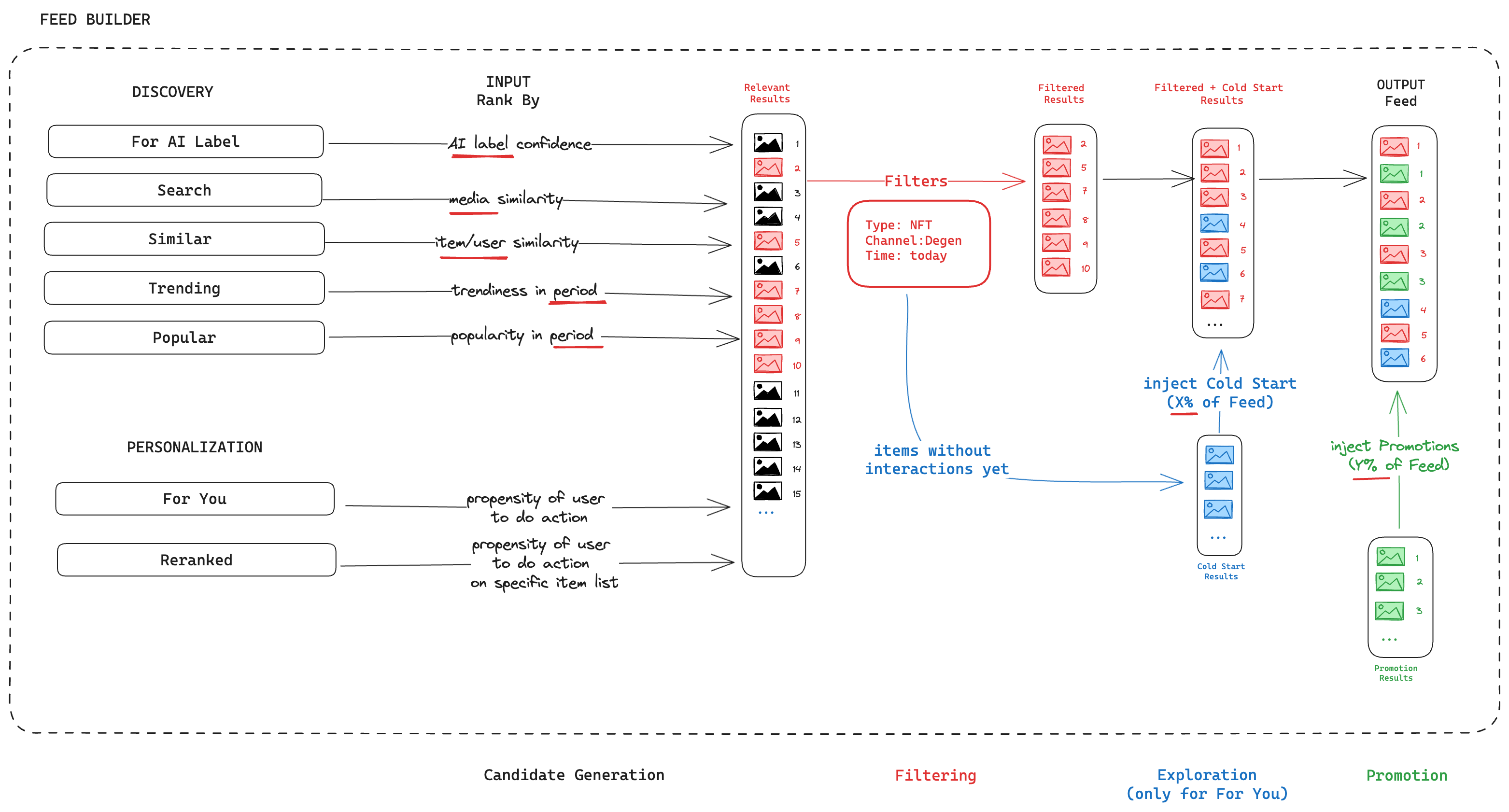
The Feed Builder uses outputs from all four pipeline stages to construct personalized feeds. Here's how the stages map to Feed Builder functionality:
Discovery finds initial content candidates using:
- AI Labels (from Enrich Media) - Rank content by topic, sentiment, or emotion confidence
- Media Embeddings (from Enrich Media) - Find visually or semantically similar content
- Similarity Matching (from Understand Graph) - Discover content similar to items users engaged with
- Trending Signals (from Understand Graph) - Surface viral or emerging content
- Popularity Metrics (from Intent graph) - Show widely-engaged content
Personalization refines candidates using:
- Interaction Predictions (from Predict) - Rank content by predicted engagement likelihood
- User Interest Profiles (from combined pipeline outputs) - Prioritize content matching user preferences
Filtering applies rules using:
- AI Labels (from Enrich Media) - Filter by topics, sentiment, moderation flags
- Content Classification (from Enrich Media) - Filter by media type, format
- Time/Channel/Author (from Standardize) - Filter by publication date, channel, or creator
Exploration ensures diversity by:
- Injecting new content without user interaction history (using graph analysis from Understand Graph)
- Preventing filter bubbles and enabling discovery of new interests
Promotion integrates sponsored content using:
- Content validation and classification from Standardize and Enrich Media
- Maintaining feed quality while enabling monetization
Data Source Integration:
- Onchain Graphs (Agents, Intent, Assets) provide verifiable, permanent records of user identities, interactions, and content
- Offchain Graphs (Impressions, Metadata, Catalog) provide rich, contextual data like AI analysis and view history
- Combined, they enable highly personalized, relevant feed experiences
Key Concepts: Onchain vs Offchain
To understand how the pipeline works, it helps to know the two types of data sources:
Onchain Data (Blockchain-Recorded):
- Agents - User profiles and wallet addresses (e.g., Farcaster IDs, Zora creators)
- Intent - User actions recorded onchain (follows, likes, purchases, trades)
- Assets - Content recorded onchain (Farcaster casts, Zora coins, Polymarket markets)
Offchain Data (Platform-Specific):
- Impressions - View and exposure tracking (prevents showing duplicate content)
- Metadata - AI analysis and enrichment (labels, embeddings, features from Enrich Media)
- Catalog - Complete inventory of all available content and users
The pipeline combines both to create a complete picture: onchain data provides verifiable, permanent records, while offchain data adds rich context and analysis.
Learn more: See the Data Sources guide for detailed information about onchain and offchain graphs.
What Gets Created: The Outputs
The pipeline produces several key outputs that power Feed Builder:
User & Item Profiles - Unified profiles for users and content that combine onchain identity with offchain analysis, enabling consistent tracking across platforms.
Moderation Labels - AI-generated labels for spam, hate speech, bot detection, and content quality that can be used to filter feeds.
Similarity Matching - Vector embeddings that enable finding similar users and content based on interests, behavior patterns, and content characteristics.
Personalization Predictions - Real-time predictions of user engagement that power personalized feed ranking.
These outputs work together: moderation labels filter out bad content, similarity matching enables discovery, and personalization predictions ensure users see content they'll actually engage with.
Summary
The Embed AI pipeline transforms raw social media data into actionable insights through four sequential stages:
- Standardize - Clean and normalize data from multiple sources
- Enrich Media - Extract AI labels, embeddings, and features from content
- Understand Graph - Analyze relationships to discover trends, communities, and patterns
- Predict - Generate personalized recommendations using machine learning models
These results power personalized feeds, content discovery, spam filtering, and user recommendations—all configurable through Feed Builder without writing code.
Next Steps:
- Learn how to use these features in Feed Builder Quick Start
- Explore all feed configuration options in Feed Builder Complete Guide
- Understand the data sources in the Data Sources guide
- Understand best practices in What Makes a Good Feed
Updated 16 days ago