
Step 4: Feed Construction
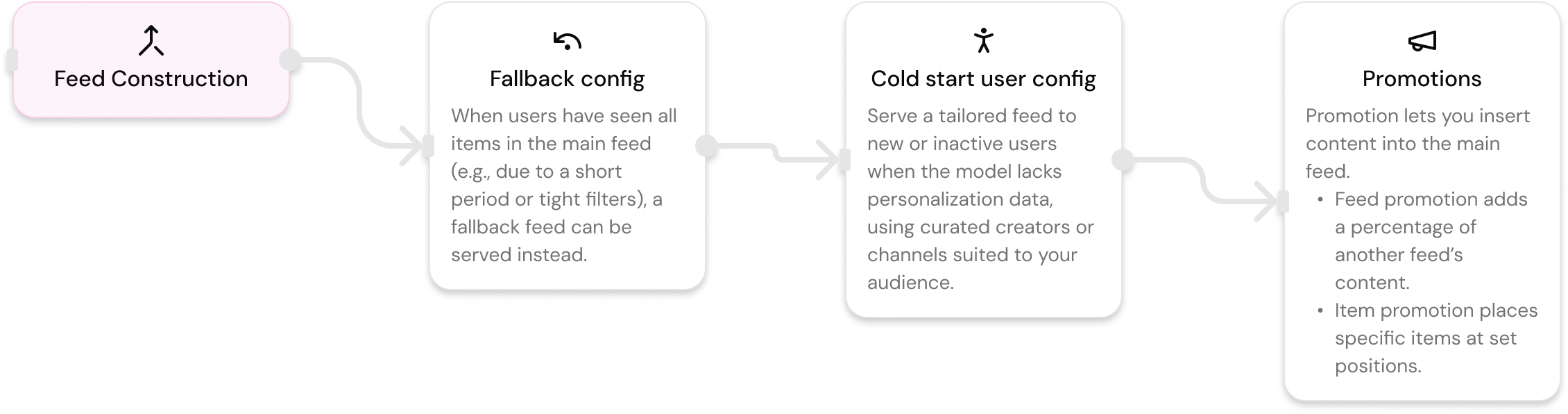
Add logic for fallback, cold starts, and promotion feeds. Make sure every user always sees something—even if they're new or inactive. Configure fallback feeds, customize cold start behavior, or mix other feeds directly into the feed experience.
Fallback Feeds
fallback_feeds
fallback_feedsSpecify alternative feeds to show when the main feed runs out of content.
Description: A feed can "run out of items" when a user has seen all items satisfying the feed configuration options. Fallback feeds specify alternative feeds to show the user when the main feed runs out. A maximum of 3 fallback feeds can be specified, and they will be used in the order specified, when the previous active feed is completely consumed.
Format: Array of objects, maximum 3 items
Example:
{
  "fallback_feeds": [
    {
      "feed_id": "feed_390"
    },
    {
      "feed_id": "feed_624"
    },
    {
      "feed_id": "feed_625"
    }
  ]
}
Use Cases:
- Ensure users always have content to see
- Graceful degradation when primary feed is exhausted
- Multi-tier content strategy
How it works:
- Main feed is served first
- When main feed runs out, first fallback feed is used
- When first fallback runs out, second fallback is used
- And so on, up to 3 fallback feeds
Cold Start Configuration
cold_start
cold_startStrategy for handling users with limited or no interaction history.
Description: If a user is new to the system and has no interaction history, or if the user has not been actively interacting with content for a long period of time, there is not enough signal to recommend a "good" feed to the user. In these cases, a cold start feed is used.
Properties:
feed_id(required) - ID of a previously created feed config to use for cold start users
Example:
{
  "cold_start": {
    "feed_id": "trending-feed-xyz"
  }
}
Best Practices for Cold Start Feeds:
-
Use AI Labels: Select content topics that represent topics users on your platform are likely interested in
{ "filters": { "ai_labels": ["science_technology", "business_entrepreneurs"] } } -
Curate Author Lists: Use
author_idswith a curated list of quality content creators{ "filters": { "author_ids": ["1423", "513", "99"] } } -
Use Following Graph: For returning users, include content from their followings
{ "filters": { "author_ids": ["following"] } } -
Select Quality Channels: Use
channelsto select quality channels{ "filters": { "channels": ["https://farcaster.group/founders"] } } -
Filter by Publication Type: Depending on your platform, filter by content type
{ "filters": { "publication_types": ["video"] } } -
Exclude Irrelevant Content: Use
remove_ai_labelsto exclude content not relevant to your users{ "filters": { "remove_ai_labels": ["web3_nft", "web3_defi"] } } -
Combine with Promotions: Use promotion filters to mix strategies
- 70% from interesting labels and sources
- 30% from users followed by the viewing user
Use Cases:
- New user onboarding
- Inactive user re-engagement
- Default feed for users without sufficient data
Promotions
promotion
promotionPowerful way to add variability in your feed by mixing in content from other feeds or inserting specific items.
Description: Configuration for mixing promoted/sponsored content into the organic feed. Supports two promotion types: 'feed' (blend another feed) or 'items' (insert specific posts).
Note: Currently, only 1 type of promotion (feed or items) is supported in each API call.
Feed Promotion
promotion_type: "feed"
promotion_type: "feed"Blend content from another feed configuration at a specified percentage.
Properties:
promotion_type(required) - Must be"feed"promotion_name(required) - Label that surfaces insource_feedof response itemsfeed_id(required for feed type) - ID of a previously created feed config to source promoted content frompercent(required for feed type) - Percentage of the resulting feed to contain items from this promotion (0-100)filters(optional) - Optional extra filters to refine the promotion feed
Example:
{
  "promotion": {
    "promotion_type": "feed",
    "promotion_name": "video_content",
    "percent": 35,
    "feed_id": "feed_180",
    "filters": {
      "publication_types": ["video"]
    }
  }
}
How It Works:
- Main feed and promotion feed are generated
- Items are deduplicated (overlap removed)
- Promotion items are inserted at skewed-to-top positions
- Target percentage is maintained in the top-k results
- Promoted items are marked with
source_feed: "promotion:{promotion_name}"
Mixing Algorithm:
- Promotion items are biased toward early ranks (positions 1-10)
- Slots are chosen using weighted random selection (lower positions have higher weight)
- The algorithm over-fetches to account for deduplication
- Final result maintains approximately the target percentage
Use Cases:
- Mix video content into a text feed (35% videos)
- Blend trending content into personalized feed
- Add category-specific content (e.g., 20% NFT content)
- Sponsored content integration
Best Practices:
- Set reasonable percent values (10-30% is typical)
- Values over 50% may feel spammy
- Track
source_feedin analytics to verify blend - Quality matters—promotion feed should be well-ranked
Item Promotion
promotion_type: "items"
promotion_type: "items"Insert specific posts at defined positions in the feed.
Properties:
promotion_type(required) - Must be"items"promotion_name(required) - Label that surfaces insource_feedof response itemspromoted_items(required for items type) - Array of items to be inserteditem_id(required) - The hash of the item to be insertedrank(required) - The position (starts from 1) to insert the item into the main feed
Example:
{
  "promotion": {
    "promotion_type": "items",
    "promotion_name": "featured_posts",
    "promoted_items": [
      {
        "item_id": "0xabc123...",
        "rank": 1
      },
      {
        "item_id": "0xdef456...",
        "rank": 5
      }
    ]
  }
}
Use Cases:
- Pin specific content to top positions
- Feature important announcements
- Highlight sponsored posts at specific ranks
- Insert editorial picks
Note: If rank is not specified, items are distributed evenly throughout the feed.
Complete Feed Configuration Example
Here's a complete example combining features from all four steps:
{
  "name": "My Custom Feed",
  "endpoint": "casts/feed/for-you",
  "status": "active",
  "visibility": "private",
  "config": {
    "candidate_source": "farcaster-items",
    "candidate_source_type": "posts",

    // Step 1: Candidate Generation
    "filters": {
      "order_by": "trending_v0.0.1",
      "start_timestamp": "days_ago:7",
      "languages": ["en"],
      "publication_types": ["image", "video"],
      "ai_labels": ["science_technology", "business_entrepreneurs"],
      "engagement": {
        "min_likes_count": 5
      },
      "channels": ["https://farcaster.group/founders"]
    },

    // Step 2: Ranking
    "scoring": "balanced_feed_v0.0.1",
    "time_decay": {
      "enabled": true,
      "decay_rate": 0.75
    },
    "diversity": {
      "max_posts_per_author": 3,
      "min_distance_between_posts_from_same_author": 5
    },

    // Step 3: Visibility Filters (in feed config)
    "show_interacted_items": false,
    "remove_user_posts_from_feed": true,
    "return_only_posts_with_social_proof": false,

    // Step 4: Feed Construction
    "promotion": {
      "promotion_type": "feed",
      "promotion_name": "video_boost",
      "percent": 20,
      "feed_id": "feed_625"
    },
    "cold_start": {
      "feed_id": "feed_390"
    },
    "fallback_feeds": [
      {
        "feed_id": "feed_390"
      },
      {
        "feed_id": "feed_624"
      }
    ]
  }
}
Feature Availability by Source
Farcaster Feeds
All features are available for Farcaster feeds, including:
- All candidate generation filters
- All ranking algorithms
- All visibility filters
- All construction features
Zora Feeds
Zora feeds support:
- Most candidate generation filters (with Zora-specific additions)
- Subset of ranking algorithms (popular, trending, affinity-based)
- All visibility filters
- All construction features
Zora-Specific Features:
market_infofilters (volume, price, market cap, etc.)remove_market_inforemove_time_periodremove_publication_types
Updated 7 days ago
Now that you've learned how to build a feed end-to-end, time to deploy it.